Visualizations
Every figure of a run, from the input data to the result — what it shows, how to read it and
where it is. The figures are drawn once (erdr.export.figures) and shown everywhere: the desktop
application, the PNG/SVG files, the Excel workbook and the HTML report (ADR-012). In every figure
of a run the colour is the class (K1 blue, K2 orange, …), told again by the marker shape, so
nothing rests on colour alone (ADR-019); the training sample D is aqua and the validation sample F
violet; a reading keeps one colour (literal green, closest blue).
scripts\doc_figures.py draws the images of this page from the default experiment.
Where they are
| Figure | Stage | Desktop application | Export (figures/) |
Excel sheet · HTML |
|---|---|---|---|---|
| 2-D map | data, Step 0 | Results → Figures | map.png, .svg |
Charts · top |
| r and z per object | Step 1 | Results → Figures | radii |
Charts · top |
| Hyperspheres of every object | Step 1 | Results → Figures; Hyperspheres → the spheres of an object | hyperspheres, hyperspheres/object-N |
Hyperspheres (Step 1) · before the sphere tables |
| Neighbourhood strips | Step 1 → 2 | Results → Figures; Hyperspheres → strips | strips |
Hyperspheres (Step 1) |
| Radius plane | Step 1 → 2 | Results → Figures; Hyperspheres → radius plane | radius-plane |
Hyperspheres (Step 1) |
| Step 2 priorities | Step 2 | Results → Figures | priorities |
Charts · top |
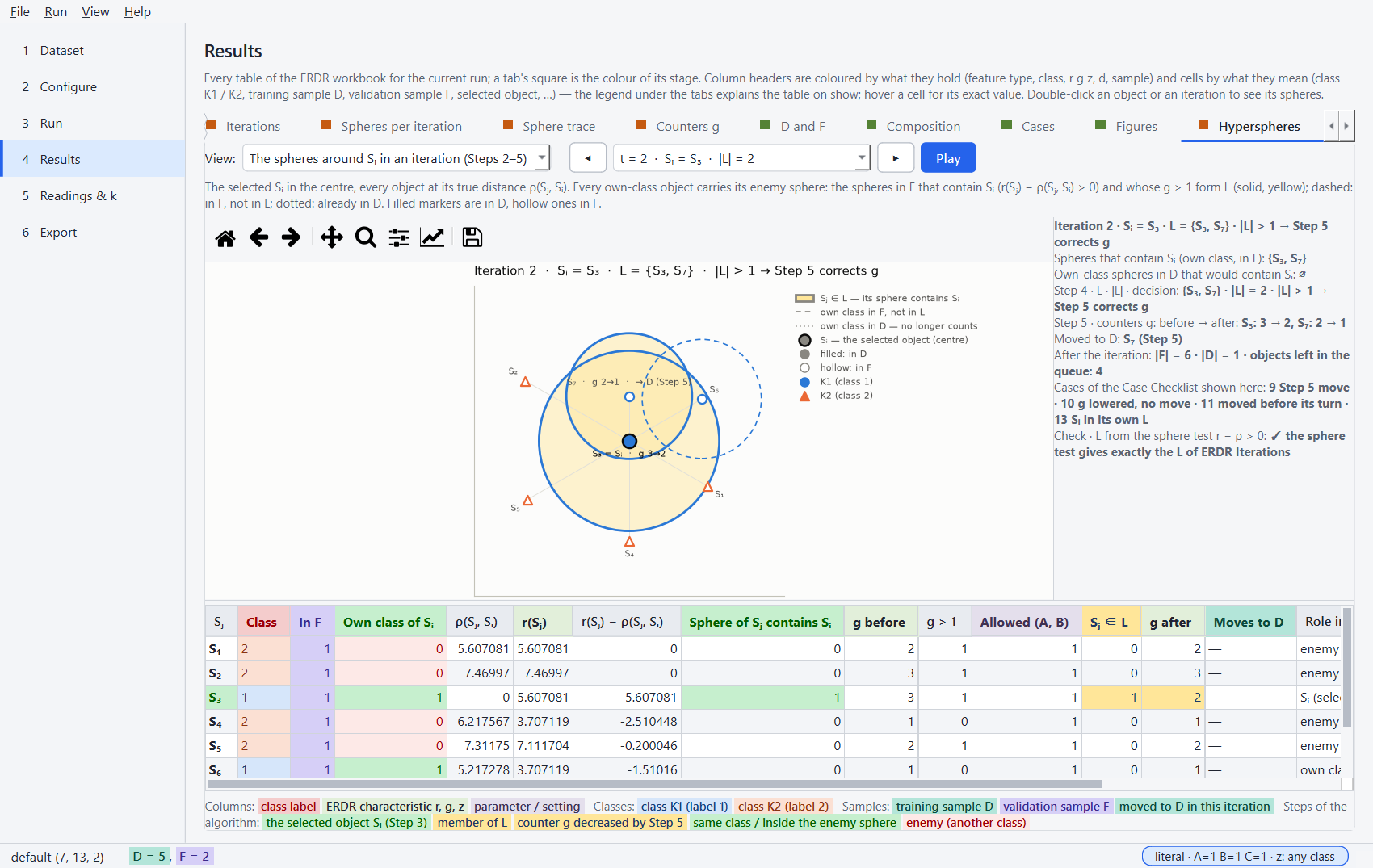
| Hyperspheres in every iteration | Steps 2–5 | Results → Figures; Hyperspheres → the spheres around Sᵢ in an iteration (◀ ▶, Play) | iteration-spheres, iteration-spheres/iteration-N, iteration-spheres.gif |
Hyperspheres (Iterations) · before the iteration tables |
| Sample sizes | Steps 2–6 | Results → Figures | sizes |
Charts · top |
| Class composition | Step 6 | Results → Figures | composition |
Charts · top |
| Readings, k sweep | readings A, B, C; k | Readings & k | readings, sweep |
Charts · top |
erdr spheres prints the sphere tables and saves the sphere figures: --object S2,
--iteration 2, --figure file.png|svg (Command line).
The data and Step 0
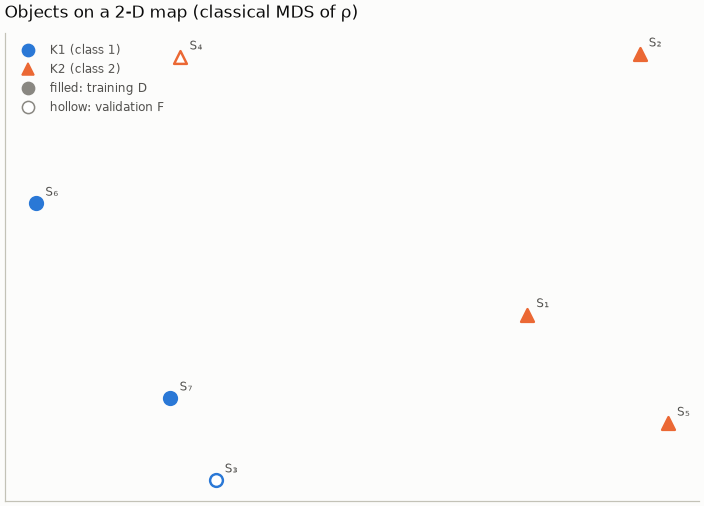
2-D map — a classical multidimensional scaling of the distances ρ: positions are approximate. Filled markers are in D, hollow ones in F.
Step 1 · r, g, z, d
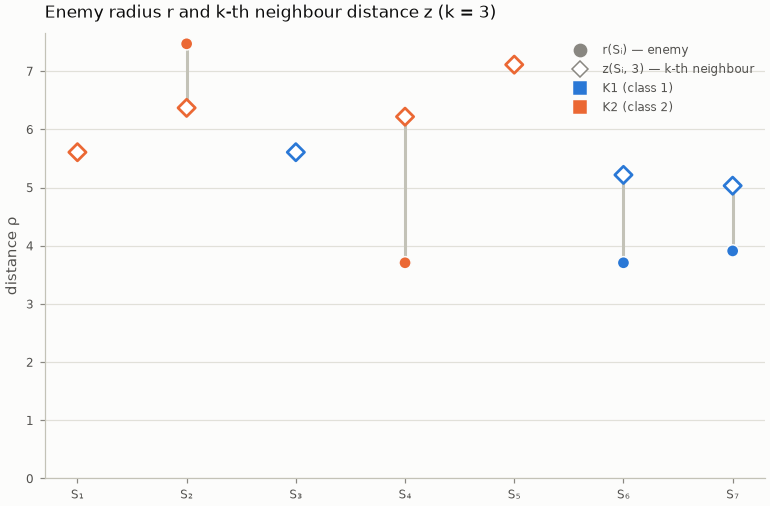
r and z per object — the enemy radius r(Sᵢ) (filled ●) and the k-th neighbour's distance z(Sᵢ, k) (hollow ◇); the bar between them is |z − r|, the numerator of d.
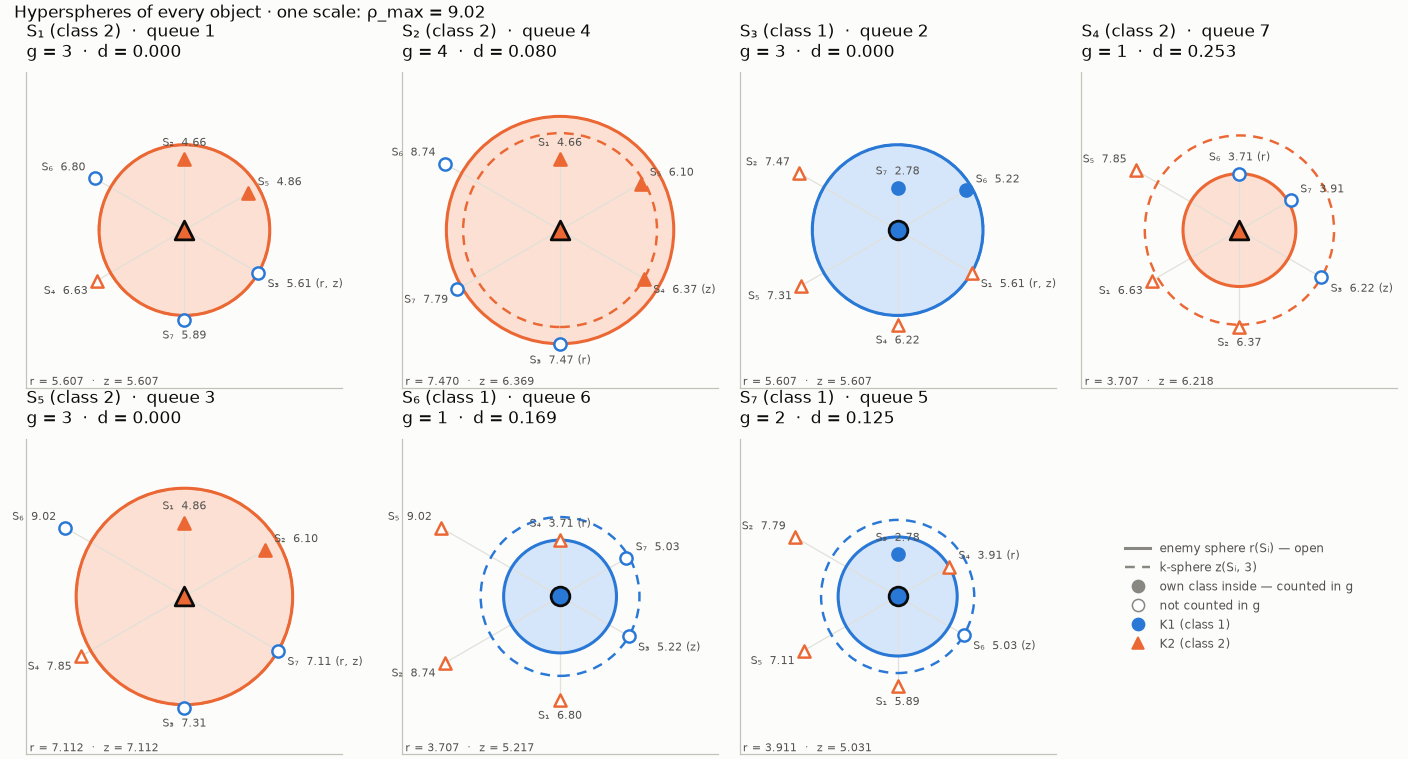
Hyperspheres of every object — Sᵢ in the centre, every other object at its true distance ρ, in Sᵢ's neighbour order clockwise from the top; only the distance from the centre is meaningful. The solid, shaded circle is the enemy sphere (through the nearest enemy, marked r): the filled markers inside are the own-class objects g(Sᵢ) counts (with Sᵢ). The dashed circle is the k-sphere (through the k-th neighbour, marked z). The two circles coincide when d = 0. All the diagrams have one scale (ρ_max), so they can be compared; a sample of more than 12 objects shows the first 12 of the Step 2 queue.
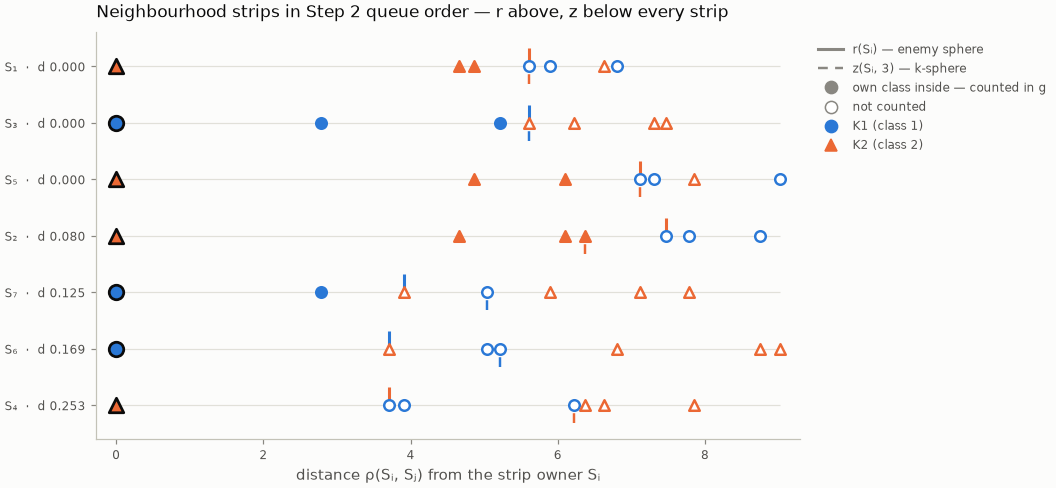
Neighbourhood strips — one strip per object, the first of the Step 2 queue at the top; every neighbour at its distance. The solid tick above a strip is r, the dashed tick below it z: the closer the two ticks, the smaller d and the earlier the object in the queue.
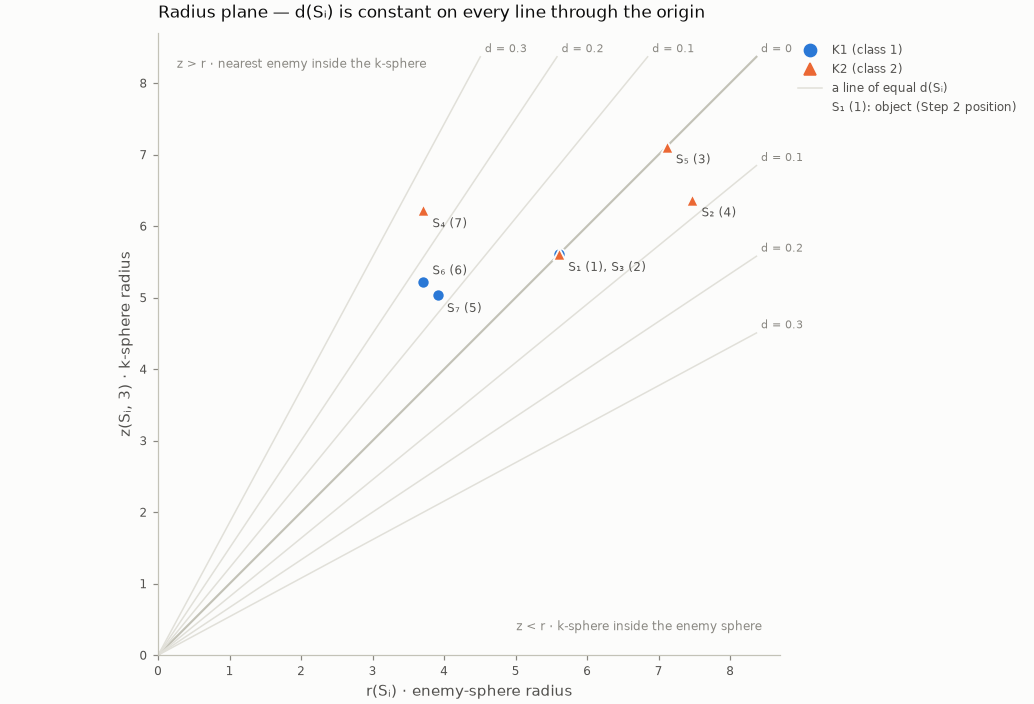
Radius plane — every object at (r, z). d is constant along every line through the origin: on the diagonal z = r (d = 0), below it the k-sphere lies inside the enemy sphere (z < r), above it the nearest enemy lies inside the k-sphere (z > r). Objects on one point tie in d and r — here S₁ and S₃, which Step 2 orders by the index (case 5).
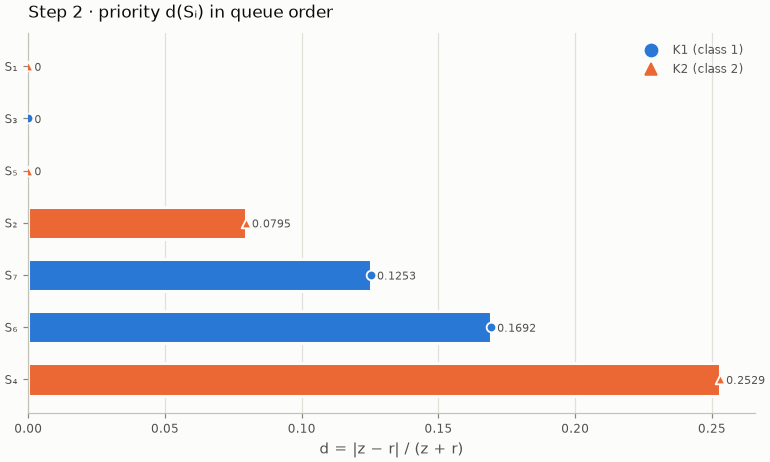
Step 2 · the queue
Priorities — d(Sᵢ) in queue order, the first object at the top.
Steps 3–5 · the iterations
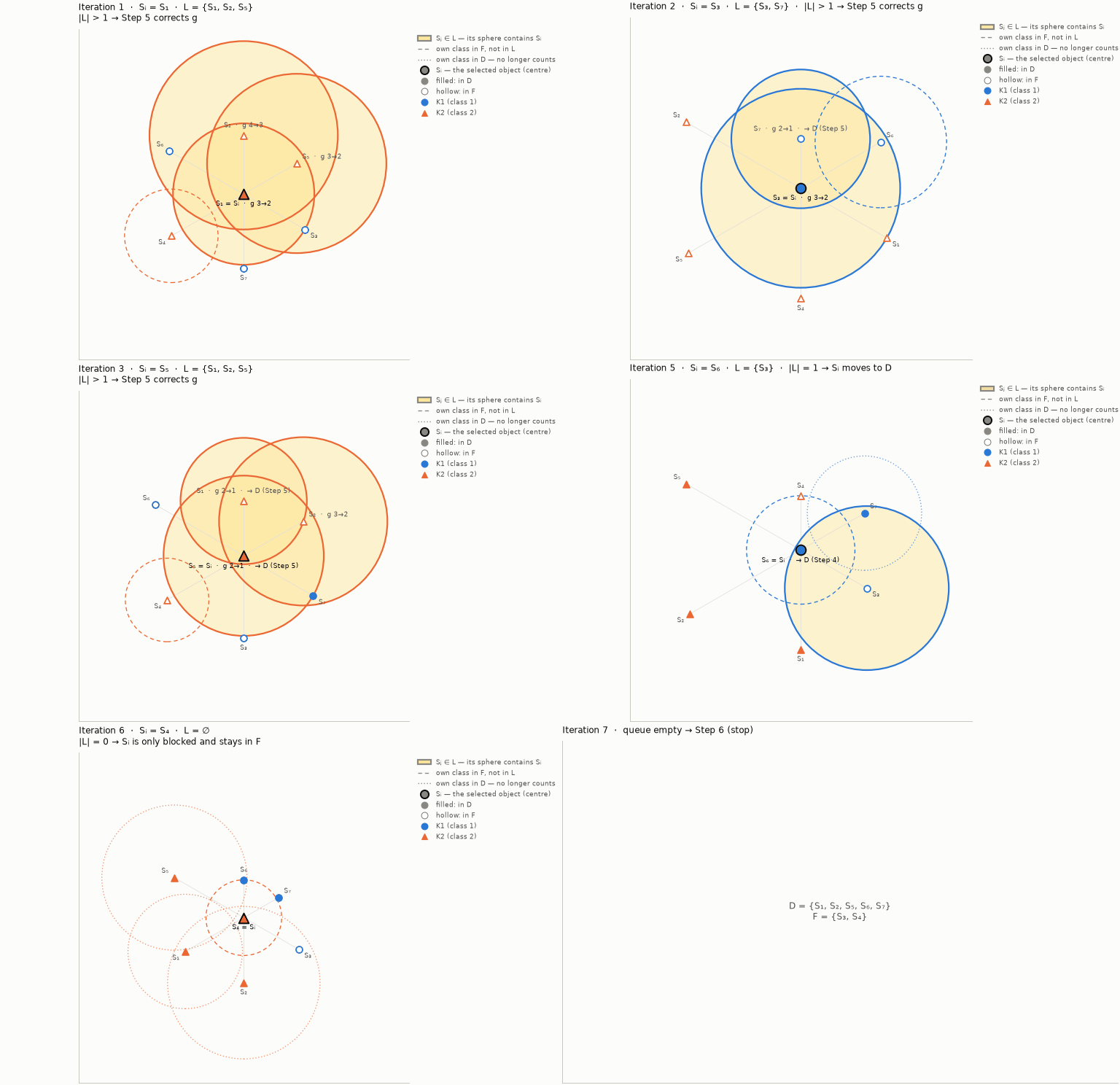
Hyperspheres in every iteration — the selected Sᵢ in the centre (dark ring), every object at its true distance ρ(Sⱼ, Sᵢ). Every object of Sᵢ's class carries its own enemy sphere, so a sphere contains the centre exactly when ρ(Sⱼ, Sᵢ) < r(Sⱼ) — the condition of Step 4:
- solid with the yellow of L — Sⱼ ∈ L: in F, its sphere contains Sᵢ, g(Sⱼ) > 1 and the readings A and B allow it;
- dashed — own class in F, not in L (its sphere does not reach Sᵢ, or reading B leaves it out);
- dotted — own class already in D: its sphere no longer counts.
Filled markers are already in D, hollow ones in F; labels show the counters g before → after and the moves to D. Above 36 objects only the spheres that contain Sᵢ are drawn.
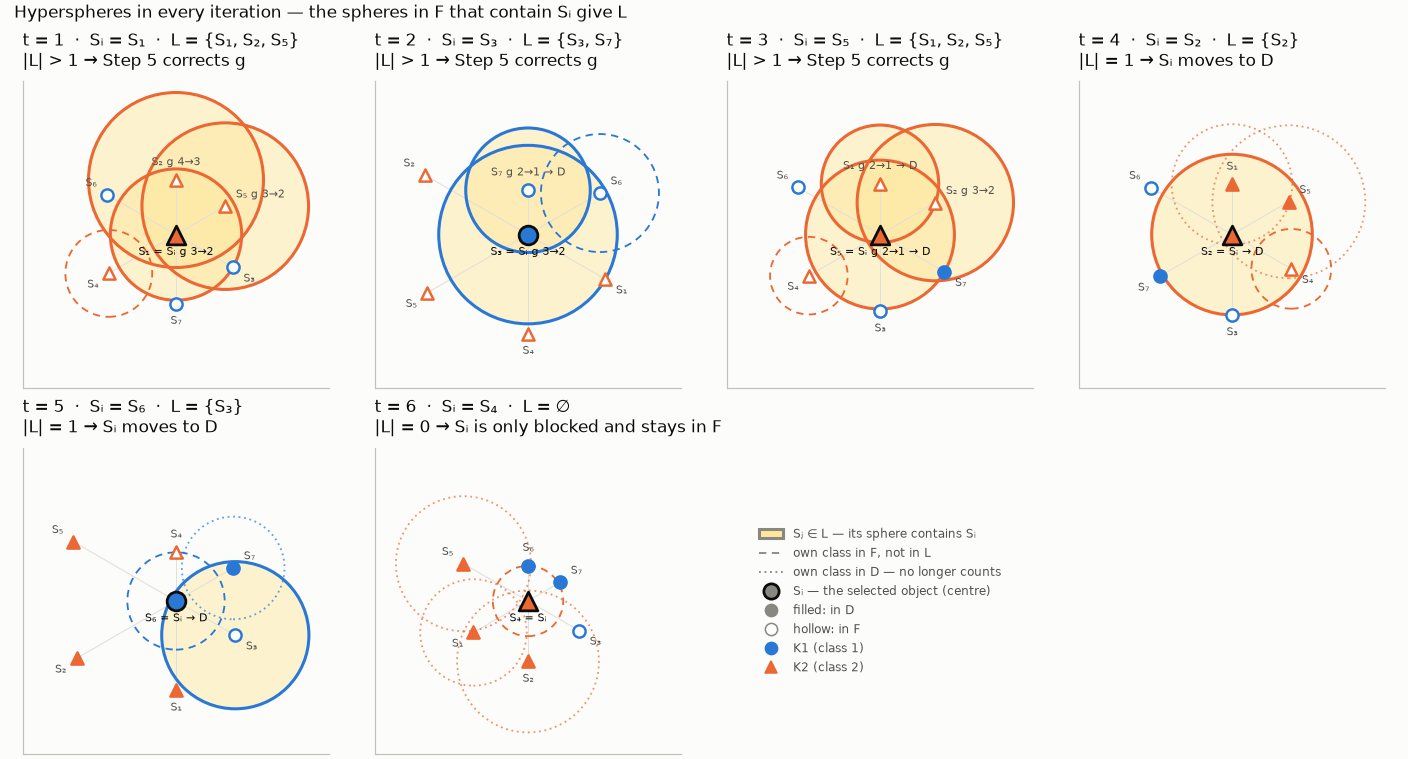
The desktop application steps through the iterations (◀ ▶ or Play) with each iteration's table and summary; the export animates them:
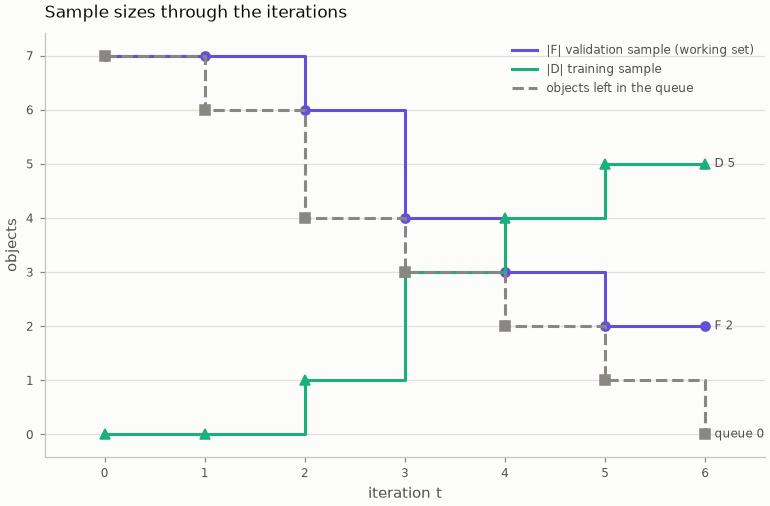
Sample sizes — |F|, |D| and the queue after every iteration, in the colours of F and D.
Step 6 · the result
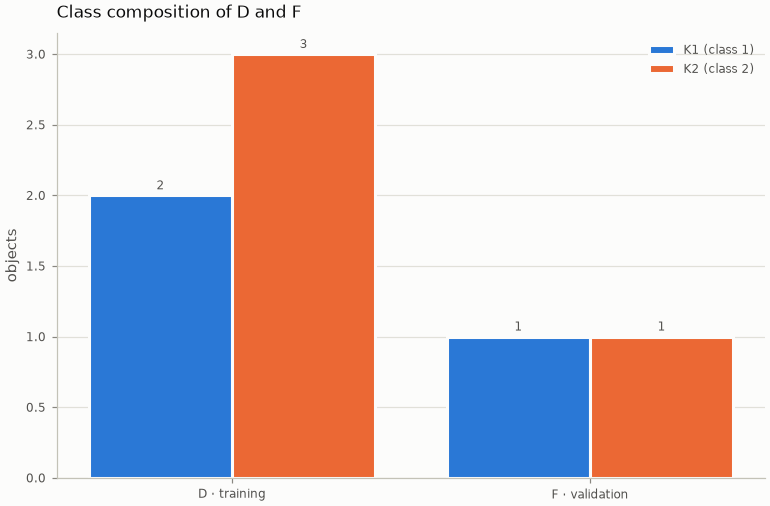
Class composition — the objects of every class in D and in F.
The desktop application
The Hyperspheres tab of the Results page explores Steps 1–5: choose the spheres of an object, the spheres around Sᵢ in an iteration, the strips or the radius plane; step with ◀ ▶ or Play. The table under the figure is the matching block of the workbook, with its legend; a double click on an object's or an iteration's row of any table opens it here.